
product
Shopify Discount Stacking: How Your Discounts Combine
Will your NavonaAI discount stack with the sale you're already running? Here's how Shopify's discount rules work, and the four settings that control them.
 ChatGPT
 Perplexity
 Gemini
 Claude
A shopper is about to leave with a full cart. Your store already has a sitewide sale running, and they have a discount code from an email. Now NavonaAI offers them a discount too. What do they actually pay?
That comes down to how Shopify combines discounts and a few settings you control. Get them wrong, and you could give away more margin than planned or show a shopper a discount that doesn't apply.
How discount stacking works on Shopify
Shopify discounts fall into three types:
- Order discounts apply to the order as a whole.
- Product discounts apply to specific products.
- Shipping discounts apply to shipping costs.
Each discount also has rules that determine which other types of discounts it can be combined with.
NavonaAI's discount is a regular Shopify discount code. It gets no special priority and follows the same combination rules as other discounts on your store.
The four settings that control stacking
You'll find these in your NavonaAI settings under Discount Combination Settings.
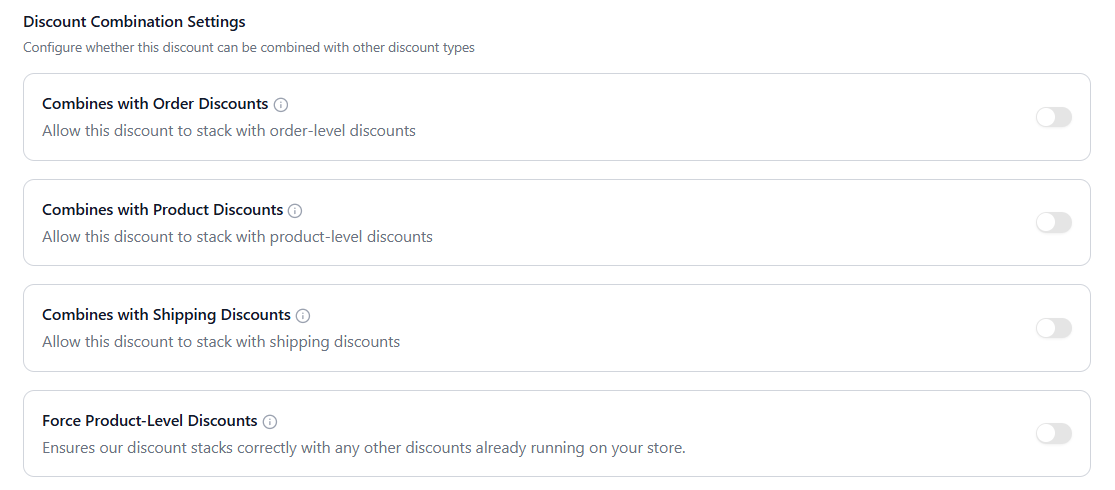
| Setting | When it's on | When it's off |
|---|---|---|
| Combines with Order Discounts | Your discount can stack with an order-level discount. NavonaAI's discount is applied after the existing order discount. | The two discounts cannot be combined. Shopify applies only the larger discount. |
| Combines with Product Discounts | Your discount can stack with a product-level discount. However, Shopify only applies one product discount to a given line item and keeps the larger one. | Your discount cannot combine with a product-level discount. |
| Combines with Shipping Discounts | Your discount can combine with a shipping discount, such as free shipping. | Your discount cannot combine with a shipping discount. |
| Force Product-Level Discounts | Your discount applies to individual product lines instead of the whole order. It also turns on automatically when you exclude a product or collection. | Your discount applies to the whole order. |
One important detail about Force Product-Level Discounts
When Force Product-Level Discounts is on, NavonaAI's discount can stack with an order-level discount but not with a product discount on the same item.
If you turn this setting on manually, Combines with Order Discounts is also turned on and locked. This means the two settings cannot be separated.
If you exclude a product or collection, NavonaAI automatically switches the discount to product-level, so you do not need to turn this setting on yourself.
An example
A shopper has a $100 cart. Your store already has a sitewide code taking 10% off, and NavonaAI offers 15% off.
| Combines with Order Discounts | What the shopper pays |
|---|---|
| On | $76.50 |
| Off | $85.00 |
With the setting on, the sitewide 10% discount reduces the cart to $90. NavonaAI's 15% discount is then applied to that $90, bringing the total to $76.50.
With the setting off, Shopify does not combine the two discounts. It keeps the larger discount, which is NavonaAI's 15%, so the shopper pays $85.
That's an $8.50 difference on a $100 order.
The trade-offs merchants often miss
None of this is a bug. It's Shopify's discount system working exactly as designed.
Excluding a product or collection changes more than what gets discounted. As soon as you exclude a product or collection, NavonaAI stops applying the discount to the whole order and starts applying it to the eligible product lines instead. That changes the type of discount. It can now stack with an order-level discount, but Shopify will not apply two product-level discounts to the same item. Read more about how product and collection exclusions work.
Two product discounts never both apply to the same item. If your store has a product sale and NavonaAI's discount is also product-level, Shopify compares the two discounts on that product and keeps the larger one. Turning Combines with Product Discounts on does not add the two discounts together. It simply allows the discounts to be considered together. For example, if a product is already 20% off and NavonaAI offers another 15% off, the customer does not get 35% off. Shopify applies the larger 20% discount.
Order discounts stack in sequence. When Combines with Order Discounts is on, NavonaAI's discount is not calculated from the original order value. It is applied after the existing order-level discount.
Every new store starts stacked with everything. When a store finishes setup, the three Combines with settings are on by default. This allows NavonaAI's discount to work alongside other discounts already running on your store. If you want to put more limits on how discounts combine, you can turn the relevant settings off in your NavonaAI dashboard.
What should you leave your settings on?
If you're not sure, the default settings allow NavonaAI's discount to work alongside other discounts on your store.
However, it's worth reviewing these settings if you regularly run sitewide sales, product promotions, free-shipping offers, or allow customers to use their own discount codes. The right setup depends on how you want your discounts to interact and how much additional discount you're comfortable offering when multiple promotions overlap.
If you'd rather test different setups instead of guessing, you can A/B test your discount stacking rules on real traffic and compare the results.
Related reading
- Tiered Discounts by Cart Value: Set Different Discounts for Different Cart Sizes
- What a Dollar of Discount Actually Returns