
product
Tiered Discounts by Cart Value: Right-Size Every Offer
One flat discount can be too much for small carts and too little for large ones. With NavonaAI's Advanced Mode, set a different offer for each cart-value range.
 ChatGPT
 Perplexity
 Gemini
 Claude
Imagine your exit discount is high enough to convince a shopper with a $300 cart to buy. That same discount is then offered to a shopper with a $30 cart, even though you may not need to give away as much to close the sale.
Lower the discount to protect your margin on smaller carts, and it may not be enough to make a difference on larger ones.
Tiered discounts let you take a different approach: each cart-value range gets its own offer.
How tiered discounts work
Tiered discounts are available in Advanced Mode, which you can turn on in your NavonaAI prevention settings.
Once Advanced Mode is enabled, the single discount field is replaced with a list of cart-value ranges that you can define.
Each range has its own discount. When a shopper is about to leave, NavonaAI identifies their cart value and offers the discount assigned to that range.
For example, you could offer:
- 10% off for carts from $90 to $149
- 15% off for carts from $150 to $349
- $40 off for carts of $350 or more
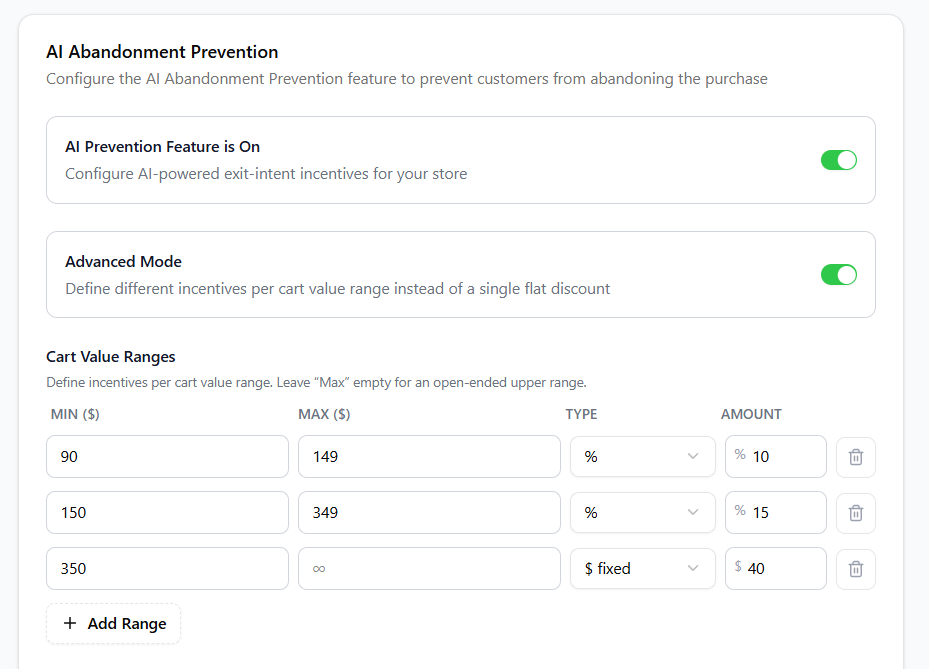
This lets you adjust the offer based on the value of the cart instead of giving every shopper the same discount.
The rules for building ranges
There are a few rules to keep in mind when creating your ranges:
- Each range has a minimum cart value and can have an optional maximum.
- Only the highest range can have no maximum. All ranges below it need one.
- The minimum value is included in the range, while the maximum is not. So if one range ends at $150 and the next starts at $150, a $150 cart belongs to the higher range.
- Ranges cannot overlap.
- Each range can use either a percentage discount or a fixed amount, and you can use both types in the same setup.
A simple example
Illustrative numbers only. A store sets up these three ranges:
| Cart value | Incentive |
|---|---|
| $90–$149 | 10% off |
| $150–$349 | 15% off |
| $350+ | $40 off |
Here's what three shoppers would be offered:
- A $120 cart gets 10% off.
- A $200 cart gets 15% off.
- A $900 cart falls into the open-ended top range and gets $40 off.
Three different cart values, three different offers.
You also don't need to set a separate minimum purchase amount for each range. The minimum value of each range already determines when that offer becomes available.
When to use tiered discounts
Tiered discounts can be a good fit if:
- Your cart values vary widely, such as when a $20 accessory can be purchased alongside a $400 bundle.
- You want to offer smaller discounts on lower-value carts while using a different offer for larger carts.
- Your current flat discount feels like a compromise: too generous for some carts and not enough for others.
A flat discount may be simpler if:
- Most of your carts fall within a narrow value range.
- You want every shopper to receive the same offer.
- You don't need different incentives for different cart sizes.
Tiered discounts also follow the same discount-combination rules as other NavonaAI discounts. Learn more in our guide to how Shopify discount stacking works.